
Foundation: Galactic Frontier Change Guild: Leave and Join
Foundation: Galactic Frontier change guild guide: how to quit a Commerce Guild, what to check first, how to pick and join a new one, and the rules for leaders.
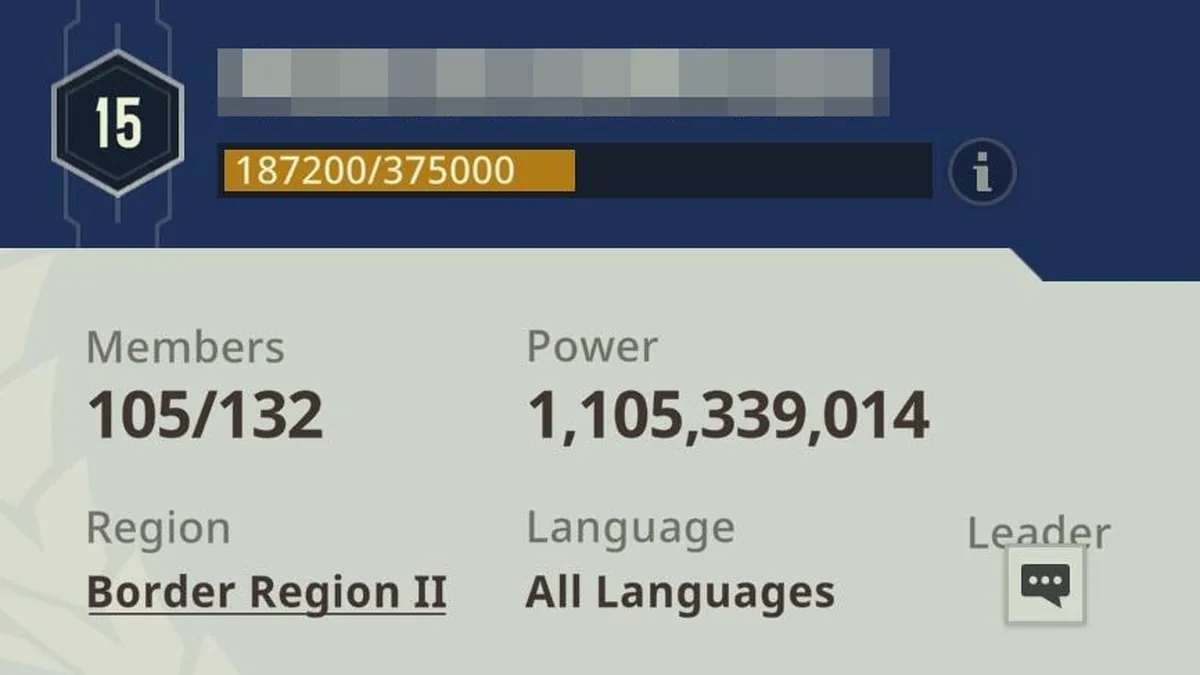
A Foundation: Galactic Frontier change guild is a two-step job: quit your Commerce Guild, then apply to or start a new one. Before the first step it pays to know what you might lose and when the game won't let you leave. This Foundation: Galactic Frontier change guild guide shows where the Quit button is (from a guide video), what to check before you press it, how FunPlus's official 10 Tips guide suggests finding a new guild, and the guild rules that patch notes added up to version 1.1.188 (October 21, 2026).
How to Leave Your Commerce Guild
FunPlus calls guilds Commerce Guilds, and the Quit button sits in their management menu. A guide video shows these steps:
| Step | Where | What to tap |
|---|---|---|
| 1 | Guild area | Open it |
| 2 | Bottom right corner of the Guild screen | The feature button |
| 3 | Feature menu | Manage |
| 4 | Manage menu | Quit, then confirm |
The confirmation asks whether you are sure you want to leave the Commerce Guild. The video's creator explains why it asks: by the time you want to come back, the guild may be full, or it may need permission to join even if it was open when you first joined. If you might want to rejoin, he suggests making sure you have a contact among the guild's higher-ranked members, so you can let them know you want back in.
What to Check Before You Quit
A few things depend on your guild, so check them first:
- The Shadowfront Battle Day. Since version 1.0.88 (February 10, 2026), players can't leave a Commerce Guild on the Battle Day of the Shadowfront event.
- Your story progress. A player on the Steam discussions reported on October 30, 2026 that the story can only be played solo until Chapter 13, and that after that you must be in an alliance to continue. A reply in the same thread calls the guild vital for progression, so plan to join a new guild soon after you quit.
- Your Home Port. The official guide says your Home Port can sit on a Port your guild occupies, and in systems above Level 5 only guilds with Planetary Ports in that system can set a Home Port there. It doesn't say what happens to a Home Port on a guild Port when you leave, so look at where yours is before you quit.
- Your region. The guild info panel shows a guild's region (Border Region II in the official screenshot at the top of this page). If the guild you want is in another region, read our change server guide first.
| Check | Why it matters | Source |
|---|---|---|
| Not the Shadowfront Battle Day | Leaving is blocked that day | App Store notes, version 1.0.88 (February 10, 2026) |
| Your story chapter | Solo play stops at Chapter 13, per a player | Steam discussions, October 30, 2026 |
| Your Home Port | Guild Ports and systems above Level 5 depend on a guild | Official Home Port guide (October 21, 2025) |
| A way back in | Your old guild may be full or need permission | Guide video |
Finding and Joining a New Guild
The official 10 Tips guide (October 21, 2025) puts joining a guild first among its tips: guild members get shared resources, coordinated battles and guild-exclusive events. Its advice for finding the right one:
- Use the in-game Chat to talk to guilds you're interested in: ask questions, read the discussions and look for players who share your values and playstyle.
- Apply to an existing guild, or ask for an invitation directly.
- Block disruptive players and report serious problems.
Being without a guild also puts you in front of recruiters. Version 1.0.61 (December 29, 2025) added a Player Recommendation feature to the Commerce Guild Recruitment interface: each day, players without a Commerce Guild are recommended to help guilds recruit.
The guild info panel from the official 10 Tips guide, the picture at the top of this page, shows what a guild's panel tells you:
| On the panel | In the official screenshot |
|---|---|
| Guild level | Level 15 |
| Members | 105 of 132 |
| Power | 1,105,339,014 |
| Region | Border Region II |
| Language | All Languages |
It is also worth asking which Ports a guild holds. Guilds that hold Ports give every member resource buffs, and Star Ports add a guild-wide Stellar Halo buff, according to the official guide to Port Occupation. The official FAQ (October 9, 2026) lists what guild members do together: protect trade routes, rally fleets and compete for space ports and territory.
Starting Your Own Guild
If no guild fits, the 10 Tips guide suggests starting your own: you set the direction, recruit members and build the community. These are the leadership rules and guild tools that the official guides and patch notes describe:
| Rule or tool | What it does | Since |
|---|---|---|
| Declaring Port wars | Only Chairmen and Executive Managers can start a Port war | Official Port Occupation guide (October 21, 2025) |
| Guild Log | Tracks members' PvP battles on the world map, member changes and management actions | Version 1.0.50 (December 17, 2025) |
| Cancelling rallies | R4 and R5 members can cancel rally deployments started by guild members | Version 1.1.0 (March 23, 2026) |
| Removing members | Guilds at Lvl 7 or above can remove at most 50 members a day | Version 1.1.0 (March 23, 2026) |
| Disbanding | Guilds at Lvl 9 or above must remove all members first; guilds that fail to find a match in the Commerce Guild Duel can be disbanded normally | Version 1.1.0 (March 23, 2026) |
| Member search | The member list can be searched by name | Version 1.1.188 (October 21, 2026) |
Version 1.0.50 also added internal guild leaderboards for Power, Glory and Technology Donations, poll and urgent announcements (unlocked through Commerce Guild Technology), and comments and likes on guild announcements.
Frequently Asked Questions
How do I change guild in Foundation: Galactic Frontier?
Open the Guild area, tap the feature button in the bottom right corner, then Manage, then Quit and confirm. After that, apply to a new guild or ask it for an invitation.
Can I leave my guild at any time?
Not on the Battle Day of the Shadowfront event: version 1.0.88 (February 10, 2026) blocks leaving a Commerce Guild that day.
Can I rejoin my old guild after a Foundation: Galactic Frontier change guild?
Only if it has room and accepts you. The guide video warns that a guild may be full or need permission by the time you want back, so keep a contact among its higher-ranked members.
Do I need a guild in Foundation: Galactic Frontier?
FunPlus's 10 Tips guide puts joining a guild first, and a player on the Steam discussions reported in October 2026 that the story can be played solo only until Chapter 13.
Related Guides
Ascendancy Shrine Loot Guide
Foundation: Galactic Frontier ascendancy shrine guide: when Shrines spawn, the level 150 ships in level 7 systems, legendary blueprint drops and quest gates.
Beginner Guide: Where to Start
Foundation: Galactic Frontier beginner guide: protect your account, push the Energy Core, keep Food, Water and Metal flowing, build one team and join a guild.
Change Server and Region Moves
Foundation: Galactic Frontier change server guide: how Province Servers and Border Regions work, the Hyperspace Teleport, its conditions and other options.

Commissions and Trade Attempts
Foundation: Galactic Frontier commissions: where Trader Commissions refresh, how Home Port level improves them, Trade Attempts by level and what they feed into.